Percentages
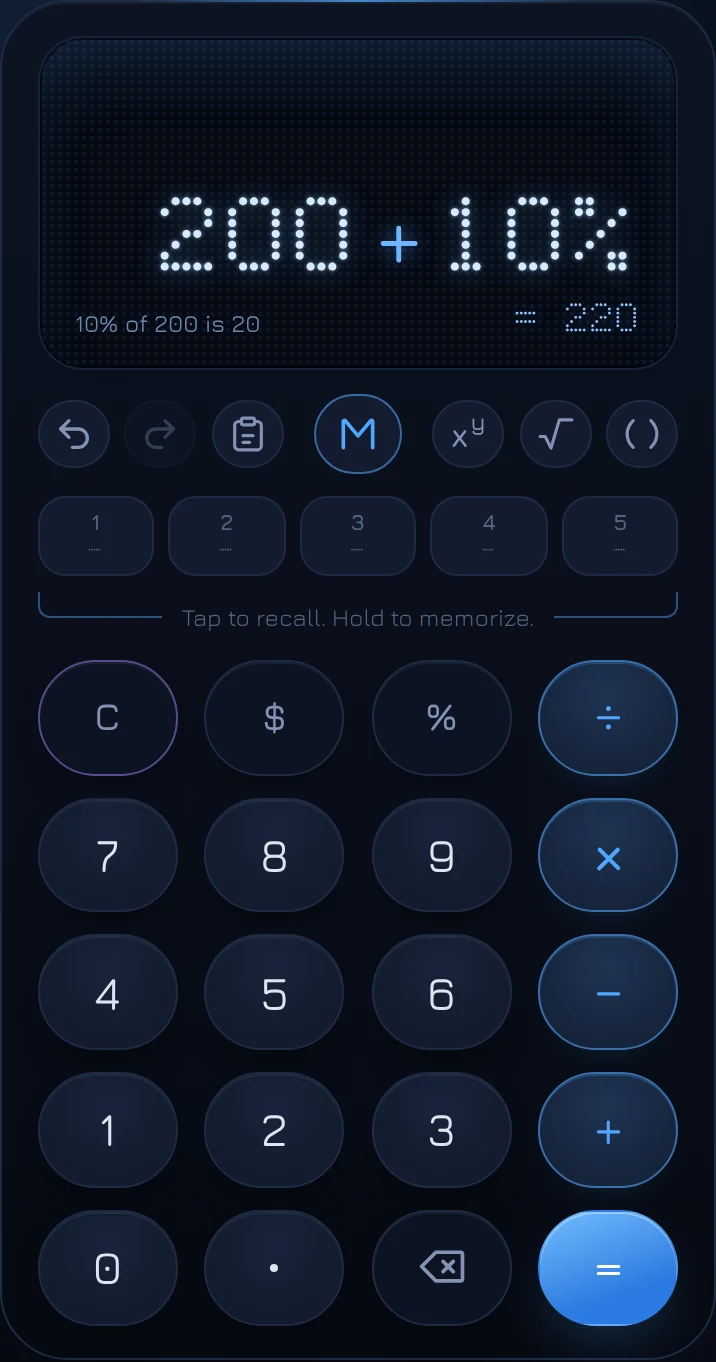
On coolca.lc, 200 + 10% is 220, and 200 − 10% is 180. A percentage after a plus or minus means "a percentage of what I have so far", which is how people actually talk about adding tax, a tip, or a discount. After × or ÷, and on its own, % does what you'd expect from the math.
The four ways % works
| You type | Result | What it means |
|---|---|---|
| 200 + 10% | 220 | 200 plus 10% of 200 |
| 200 − 10% | 180 | 200 minus 10% of 200 |
| 50 × 20% | 10 | 20% of 50 |
| 50 ÷ 20% | 250 | 50 is 20% of 250 |
| 15% | 0.15 | 15% as a number |
Every time you use %, a line at the bottom left of the display explains what it did, such as 10% of 200 is 20, so you never have to wonder how a percentage was applied.
Adding a percentage
Type the amount, +, the percentage and %. That's how you add sales tax ($49.99 + 8.25% = $54.11), a tip ($84.50 + 18% = $99.71), or a raise ($62,000 + 4% = $64,480).
Subtracting a percentage
Type the amount, −, the percentage and %. That's a discount ($80 − 25% = $60) or any reduction, like a 15% cut to a budget.
Taking a percentage of a number
Use × when you want only the percentage itself, not the new total: $84.50 × 18% = $15.21, the tip alone. Of has the same meaning as times here: 18% of $84.50 is $84.50 × 18%.
Working backward with ÷
Divide by a percentage to find the whole that a number is a part of. If $45 is 15% of something, 45 ÷ 15% = 300. The display says so in words: 45 is 15% of 300.
Percentages in longer calculations
coolca.lc follows standard math order: × and ÷ before + and −. A percentage after + or − is taken of everything before it, so 100 + 50 + 10% is 165 (10% of 150 added to 150). A percentage after × applies only to the number it multiplies: 100 + 50 × 10% is 105, because 50 × 10% is 5.
When in doubt, use parentheses. (100 + 50) × 10% is 15, clearly and unambiguously.
Why some calculators disagree
There's no single standard for the % key, and calculators really do differ. Many basic and phone calculators treat 200 + 10% the same way coolca.lc does. Others, including most spreadsheets, turn 10% into 0.1 first, so 200 + 10% becomes 200.1. Neither is wrong, but only one matches what people mean when they say "add 10%". coolca.lc chooses that one, and shows its working so there's no doubt.
Common percentage mistakes
Undoing a percentage
Adding 25% and then subtracting 25% doesn't get you back where you started: 100 + 25% is 125, and 125 − 25% is 93.75. To remove a percentage that was added, divide instead. A price that includes 25% is the original × 1.25, so the original is the price ÷ 1.25. The Sales Tax and Discount Solvers do this kind of reverse calculation for you.
Percent and percentage points
If a rate goes from 4% to 5%, it rose by one percentage point, but by 25 percent, because 1 is 25% of 4. News reports mix these up all the time. The Percent Change Solver works out the second kind.
Stacking percentages
Two discounts of 20% and 10% aren't 30% off. The second is taken from the already-reduced price, so together they're 28% off. 100 − 20% − 10% on coolca.lc gives 72, which is right.
Percent Solvers
For the everyday percentage questions, three Solvers do the setup for you and solve in any direction:
- Percent of: what is 15% of 240, what percent is 36 of 240, or 36 is 15% of what.
- Percent Change: the change between two numbers, or a number after a change.
- Proportion: A is to B as C is to D, for scaling a recipe or a map.
Questions
Does the Log remember percentage details?
Yes. A calculation with a percentage is logged with an extra line, such as 18% of $84.50 is $15.21. Tap that line to reuse the percentage amount itself instead of the total.
How do I type the % key on a keyboard?
Press % (Shift and 5 on most keyboards). Every key on the calculator has a keyboard shortcut; see the full list.