Money Calculations
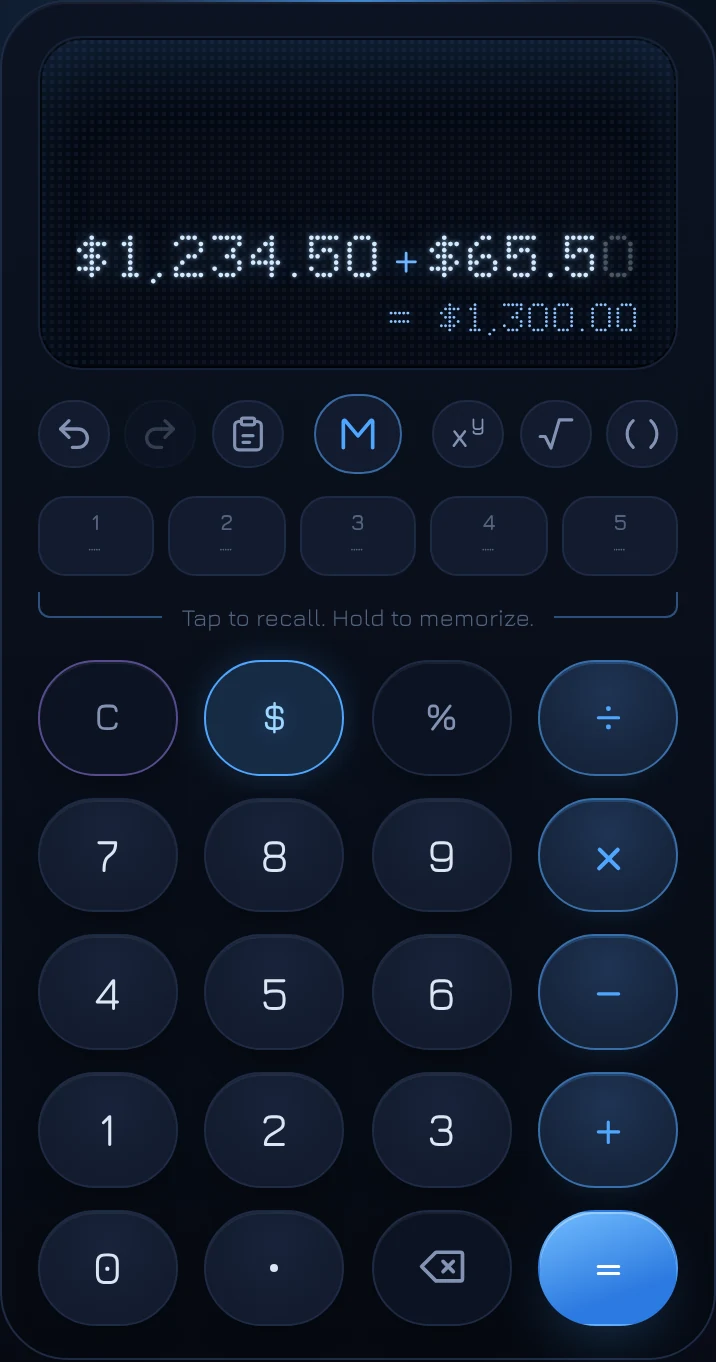
On coolca.lc, any number can be marked as money with the $ key. Money is shown with its currency symbol and thousands separators, rounded to the cent, and carried through your calculation, so the answer to $1,234.50 + $65.50 is $1,300.00, ready to paste into an email or an invoice. If you're not in the US, the $ key becomes your own currency.
Why a calculator needs to know what's money
Most calculators treat every number the same. Divide a $100 bill by 3 and you get 33.333333333, which isn't an amount anyone can pay. Add a few prices and you get 1300.5, without the second decimal place or the thousands separator that make it readable as $1,300.50. Then you reformat it by hand.
Marking money fixes that at the source. coolca.lc keeps every number at full precision while you work, and shows money the way money is written: with the symbol, the separators and exactly two decimal places (or none, for currencies like the yen that don't use them).
Marking a number as money
Tap $ (or press $ on a keyboard) before or after typing a number. Both work:
- $ then 1234.5 shows $1,234.5 while you type.
- 1234.5 then $ does the same.
Tap $ again to unmark it. The key stays lit while the number you're on is money, so you can always see which is which.
Once you type a decimal point on a money amount, the cents still to come appear as faint placeholders: $85. shows as $85.00 with the zeros dimmed, filling in as you type. An amount typed with no decimal point stays whole: $85.
How money moves through a calculation
The rule is simple: if any number in a calculation is money, the result is money.
$1,234.50 + $65.50 = $1,300.00
$89.99 × 3 = $269.97
$100 ÷ 3 = $33.33
$84.50 + 18% = $99.71
There's one exception, and it's deliberate: money divided by money is a plain number. $300 ÷ $20 is 15, not $15, because the answer is how many twenties fit in three hundred dollars. That's what you want when you're working out how many months a balance lasts, how many units a budget buys, or how one price compares to another.
Rounding to the cent
Money results are rounded to the nearest cent, half up, the way a receipt would show them. The rounding happens on the result, not along the way, so a long calculation doesn't drift a cent at a time. coolca.lc also avoids a classic computer rounding mistake: some calculators round $1.005 down to $1.00 because of how binary numbers are stored. It rounds to $1.01, as you'd expect.
Whole amounts with the decimal key
On a money result, the decimal key flips between the amount with cents and the whole amount: $12.40 becomes $12, and tapping it again brings back $12.40. Whichever you're showing is what carries into your next calculation. It's handy for rough budgets and for rounding before you split something.
You can also mark a finished result as money after the fact: tap $ on a result and it's rounded to the cent and shown as money. Tap again to turn it back into a plain number.
Your currency and number format
coolca.lc follows your browser's language and region settings automatically. In Germany you'll see 1.234,56 €; in the UK, £1,234.56; in India, ₹1,234.56 with Indian digit grouping; in Japan, ¥1,235 with no decimals. The $ key shows your currency's symbol, and the decimal key shows a comma if that's what your region uses.
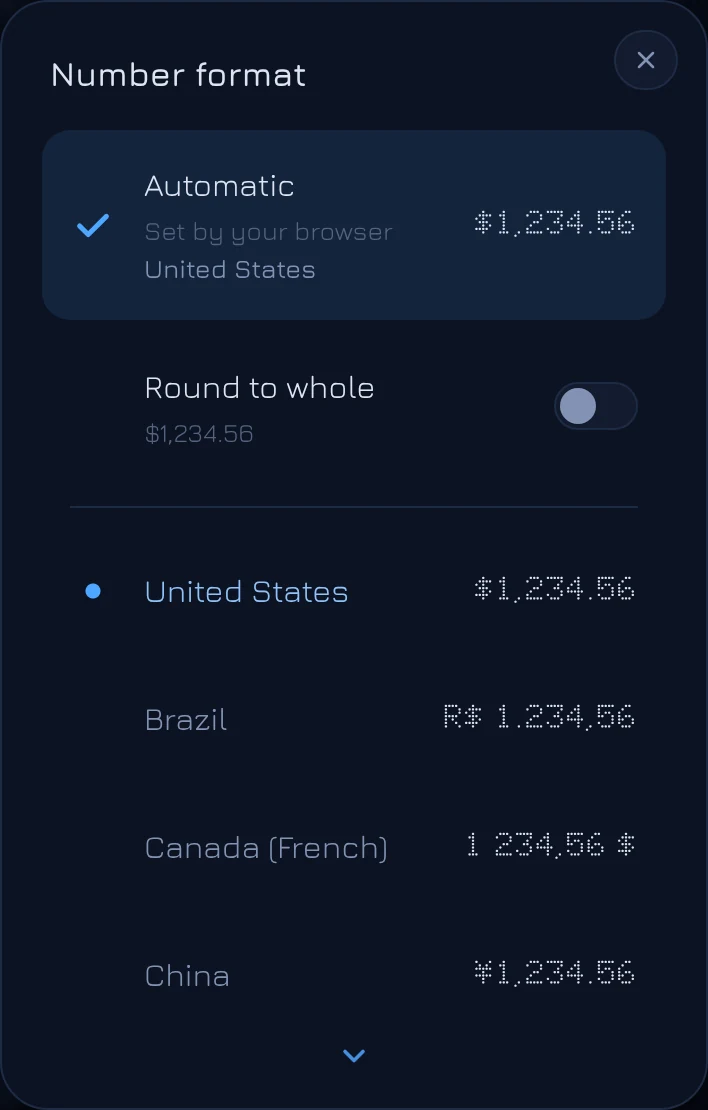
To choose a format yourself, hold the money key (or press N). The Number format list shows each option with a sample amount:
- Automatic follows your browser, and names the region it's using.
- Round to whole, right under it, makes money round to whole amounts everywhere: $1,234.56 shows as $1,235. (It's only offered for currencies that use decimals.)
- Below those, the United States comes first, then every other format that looks different, from Brazil, Canada (French) and China through to the United Kingdom. A small dot marks the one that matches your browser.
Picking a format applies it right away, and marks the number you're on as money if it wasn't already. It applies everywhere: the display, the Log, presets, and the examples in the Solvers list. Unit conversions follow it too, so choosing a metric country puts centimeters before inches and Celsius before Fahrenheit.
Copying and pasting money
Click or tap the display to copy the result, or press Ctrl C (⌘ C on a Mac). What you get is exactly what's shown, with the symbol and thousands separators, ready to paste into a document, a spreadsheet or a message.
Pasting works the other way. coolca.lc reads amounts written in any common style: $1,234.50, 1.234,50 €, CHF 1'234.50, or an accounting-style negative like (42.10). Paste a whole list of amounts and it adds them up for you; see adding up a list.
Questions
Does coolca.lc convert between currencies?
No. The currency symbol shows how amounts are written where you are; it doesn't change their value. Exchange rates change by the minute and need a live source, so they're outside what a calculator should guess at.
Why is my result showing more decimals than I expected?
The result isn't marked as money. Plain numbers keep up to 15 significant digits so nothing is lost in a technical calculation. Tap $ on the result to round it to the cent.
Can I mix money and percentages?
Yes, and it's one of the most useful things to do: $84.50 + 18% adds an 18% tip, and $49.99 − 25% takes 25% off. See how percentages work.