Memory Presets
Memory presets are five buttons above the keypad that hold numbers for you. Tap an empty one to save the number on the display, tap it again later to drop that number into whatever you're calculating, and hold it to save something new over it. They stay put between visits, so a number you saved last week is still there today.
Why presets instead of a memory key
Classic calculators have one memory slot and a row of cryptic keys: M+, M−, MR, MC. You can only hold one number, you can't see it, and it's easy to add to it by accident. coolca.lc replaces all of that with five visible slots, each showing what it holds. Nothing is hidden, and nothing is added to a slot unless you tell it to replace what's there.
Good things to keep in a preset:
- A rate you use constantly, like your local sales tax (8.25) or a commission percentage.
- A price you multiply often, like a per-unit cost or an hourly rate.
- A running figure such as a budget, a monthly payment or the subtotal from an earlier calculation.
- A constant you'd rather not retype, like 1.609 for miles to kilometers or 365.
Saving a number
Get the number you want on the display, then tap an empty preset. That's it. The preset lights up and shows the number in a compact form. A quick "Memorized in preset 2" message confirms it.
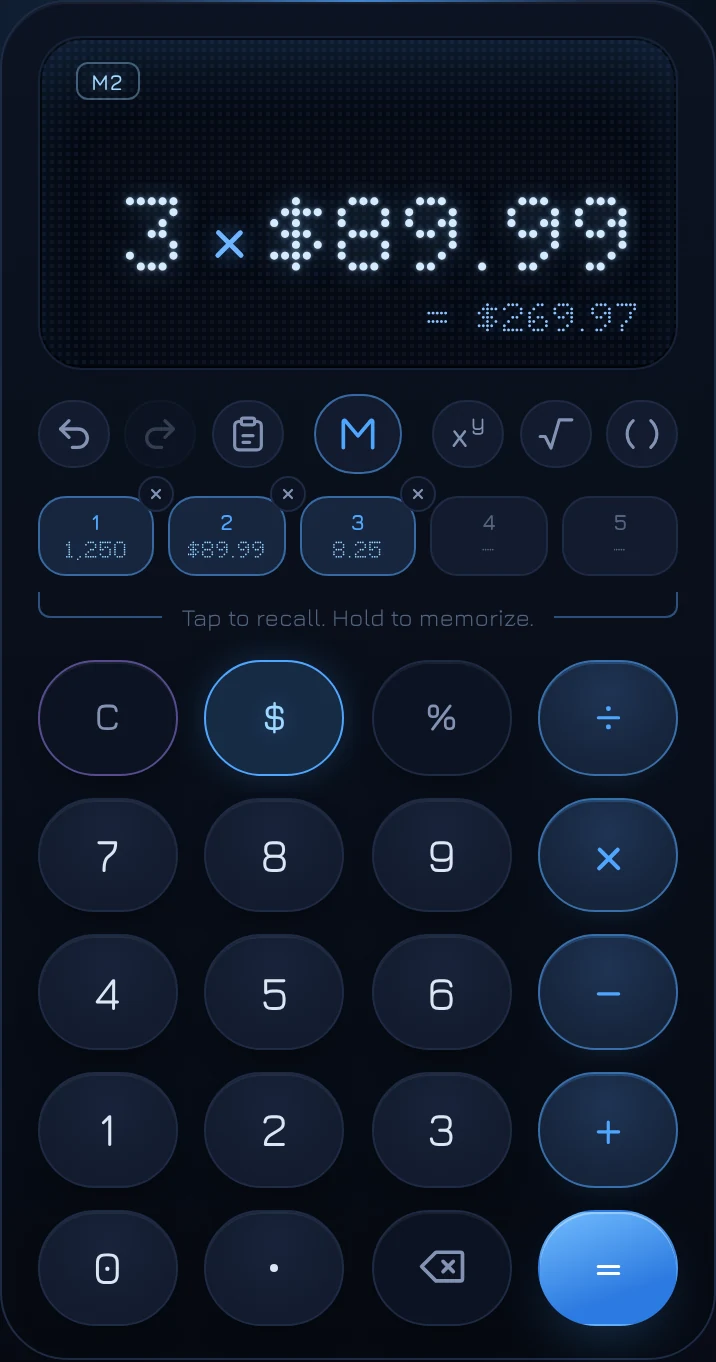
You don't have to finish a calculation first. If the display shows 3 × 89.99 and you tap an empty preset, it saves what that calculation comes to: 269.97. Presets always save what the display amounts to right now.
Money stays money. Save $89.99 and the preset holds it as a dollar amount, so it comes back with its $ and its cents. Save 8.25 and it comes back as a plain number.
Recalling a number
Tap a filled preset and its number goes into your calculation, exactly as if you'd typed it:
- After an operator, it becomes the next number: 3 × then preset 2 gives 3 × $89.99.
- While you're typing a number, it replaces that number.
- On a finished result, it starts a new calculation.
A small badge such as M2 appears at the top of the display so you know where the number came from. It disappears as soon as you change anything.
Replacing and clearing
Replace: to save a new number into a preset that's already full, hold it for about half a second. A line fills under the button while you hold, and the new number takes its place when it completes. Letting go early is just a tap, which recalls instead.
Clear: there are two ways.
- Tap the small × on the preset's corner. With a mouse it appears when you hover; on touch screens it's always there.
- Clear the display (tap AC), then hold the preset. Saving "nothing" empties it, and the hold line turns red to show that's what's about to happen.
Made a mistake? Undo brings back whatever a preset held before you saved over it or cleared it.
How presets show big numbers
Preset buttons are small, so each one shows the most complete version of its number that fits: the full amount if there's room, then the amount without zero cents ($12,450.00 becomes $12,450), then a short form such as $124K or 1.5M. The full value is always kept; only the label is shortened. Hover over a preset with a mouse to see its full value.
Using the keyboard
| To | Press |
|---|---|
| Save into a preset | M then 1–5 |
| Recall a preset | R then 1–5 |
| Clear a preset | Esc, then M then 1–5 |
After you press M or R, the presets light up for a moment to show they're waiting for a number. Press the same letter again, or Esc, to cancel.
Memory presets and Solver presets
The row of presets has a second side. When you load a Solver, the row rolls over to show that Solver's slots, such as Bill, Tip % and People, which work much like presets. The button in the middle of the control row shows which side you're on: M for Memory presets, ƒx for Solver presets. Tap it, press Tab, or swipe the row up or down to switch. Your Memory presets are never touched by a Solver.
Questions
Do my presets stay saved?
Yes. They're stored in your browser on this device, so they're there whenever you come back. They aren't sent anywhere and don't follow you to another device or browser.
Can I save a percentage?
Presets save the value the display amounts to. Saving 18% on its own stores 0.18, its value as a number. To keep a rate you'll type as a percentage, save it as a plain number, like 18, and add the % after recalling it.
Why five?
Five fit comfortably above the keypad on a phone, each with a readable label, and cover nearly every everyday use. If you need more, the Log keeps your last 100 results, and any of them can be tapped to reuse.