Round Up to the Next 5
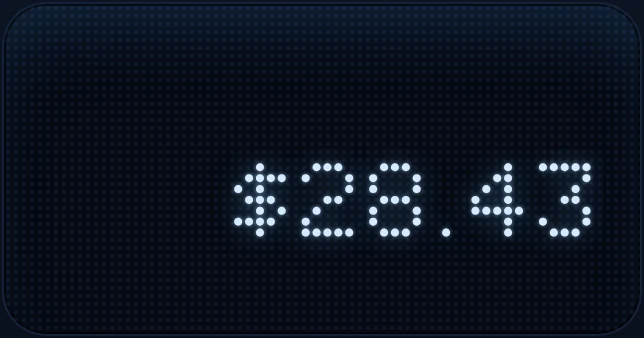
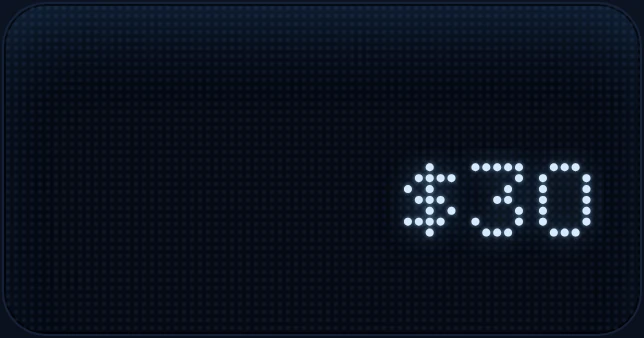
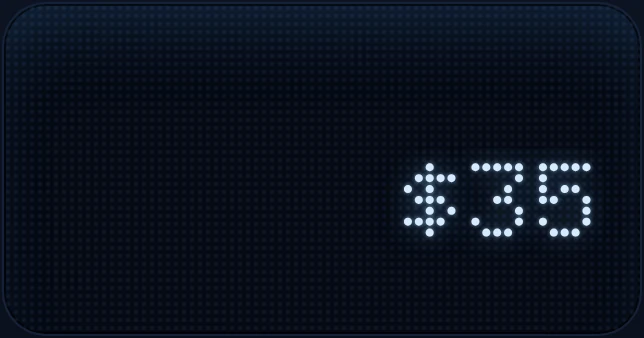
To round a number up on coolca.lc, hold the + key. The number on the display goes up to the next multiple of 5: $28.43 becomes $30. Keep holding and it keeps going, one step a second: $35, $40, and so on. Let go when it shows the amount you want. On a keyboard, press U.
Why round up
Plenty of everyday amounts are easier as round numbers. You'd rather leave a $30 tip than $28.43, put $40 in an envelope for a shared gift, or plan a budget in fives instead of cents. Rounding by eye works, but it means reading the number, working out the next round amount, clearing the display and typing it in. Holding + does all of that in one press, and the rounded number carries straight into whatever you do next.
How it works
 Hold +
 Keep holding
- Get the number you want to round on the display: type it, finish a calculation, or recall it. Here, $28.43.
- Hold +. After a moment the number rounds up to the next multiple of 5, $30, and a short message confirms it: Rounded up to $30.
- To go further, don't let go. As long as you keep holding, the number keeps stepping up, one more 5 every second: $35, $40, $45. Let go when it shows the amount you want.
You can also round in separate holds: let go at $30, then hold + again later to step on to $35.
A quick tap on + still adds, as always. Only a hold rounds.
| Start | Hold once | Twice | Three times |
|---|---|---|---|
| $28.43 | $30 | $35 | $40 |
| $30 | $35 | $40 | $45 |
| 17.75% | 20% | 25% | 30% |
| −$28.43 | −$30 | −$35 | −$40 |
A number that's already on a multiple of 5 goes to the next one, so $30 becomes $35. Negative amounts round away from zero: −$28.43 becomes −$30, the same size of step as for a positive amount.
On a keyboard: U
Press U to round up one step. Hold it down and it keeps rounding at the same pace as holding +, one step a second, so it's just as easy to stop where you want. The + key lights up each time, since U and the hold share the same job.
What it rounds
Rounding works on whichever number is current on the display:
- The number you're typing. Type 28.43 and hold +: 30.
- The last number in a calculation. 12 + 28.43 becomes 12 + 30; the rest of the calculation stays as it is.
- A finished result. Work out a total, then round it.
- A recalled number, from a Memory preset, a Solver slot or the Log.
- Percentages. 17.75% becomes 20%.
Two things aren't rounded: a number under a square root while you're still typing it (√28), and a number in scientific notation. Once √28 has an answer, that answer rounds like any other number.
Undo and Solver slots
Every step can be undone. If you hold a moment too long and land on $35 when you wanted $30, undo (the curved arrow, or Ctrl Z) takes you back one step.
A rounded number counts as typed. That matters in a Solver: after rounding, tap a slot and the rounded number is stored there, exactly as if you'd typed it yourself.
Example: rounding a tip up
Dinner comes to $113.70, and a 25% tip in Tip & Split works out to $28.43. You'd rather leave an even $30:
- Tap the Tip $ slot to bring $28.43 to the display.
- Hold + until it shows $30.
- Tap Tip $ again to store it.
Tip % updates to 26.39%, and Pay to $143.70. More in how much to tip.
Rounding up versus the decimal key
Holding + isn't the same as the decimal key's whole-amount flip, described in money calculations. On a finished amount, tapping the decimal key drops the cents: $28.43 becomes $28, and tapping again brings the cents back. Holding + always goes up, to the next 5: $28.43 becomes $30. Use the decimal key to see an amount without its cents, and hold + when you want a round number to pay or plan with.
Questions
Can it round to the nearest dollar, or down?
Holding + always rounds up, in steps of 5. For an amount without its cents, use the decimal key on a finished amount, as described above.
Why does $30 go to $35 instead of staying $30?
So that every hold does something you can see. If you're already on a round number, the next step is the next 5. If you went one step too far, undo brings you back.
Does a tap on + ever round?
No. A quick tap adds, as it always has. Rounding needs a deliberate hold, the same length of hold as on 0, which types thousands; see type thousands and millions fast.